For Stellantis and Renault-group cars

Every module in your car, on your iPhone.

Coding, feature activation, PIN code and key programming, full ECU scans and a PDF health report for Dodge, Jeep, Chrysler, RAM, Alfa Romeo, Fiat, Renault, Dacia and Nissan. All you need is an iPhone and an OBD adapter.

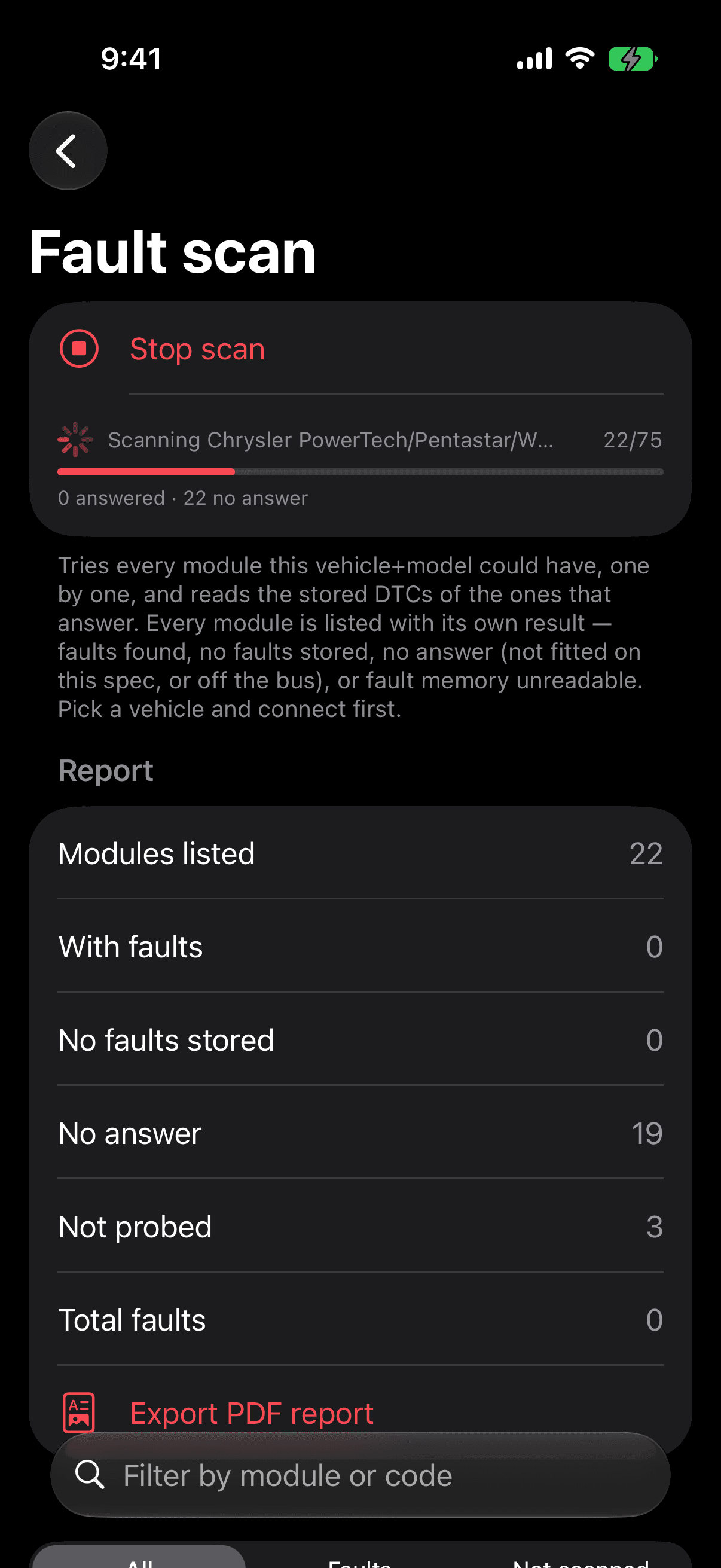
MopCoder scanning every module for stored faults
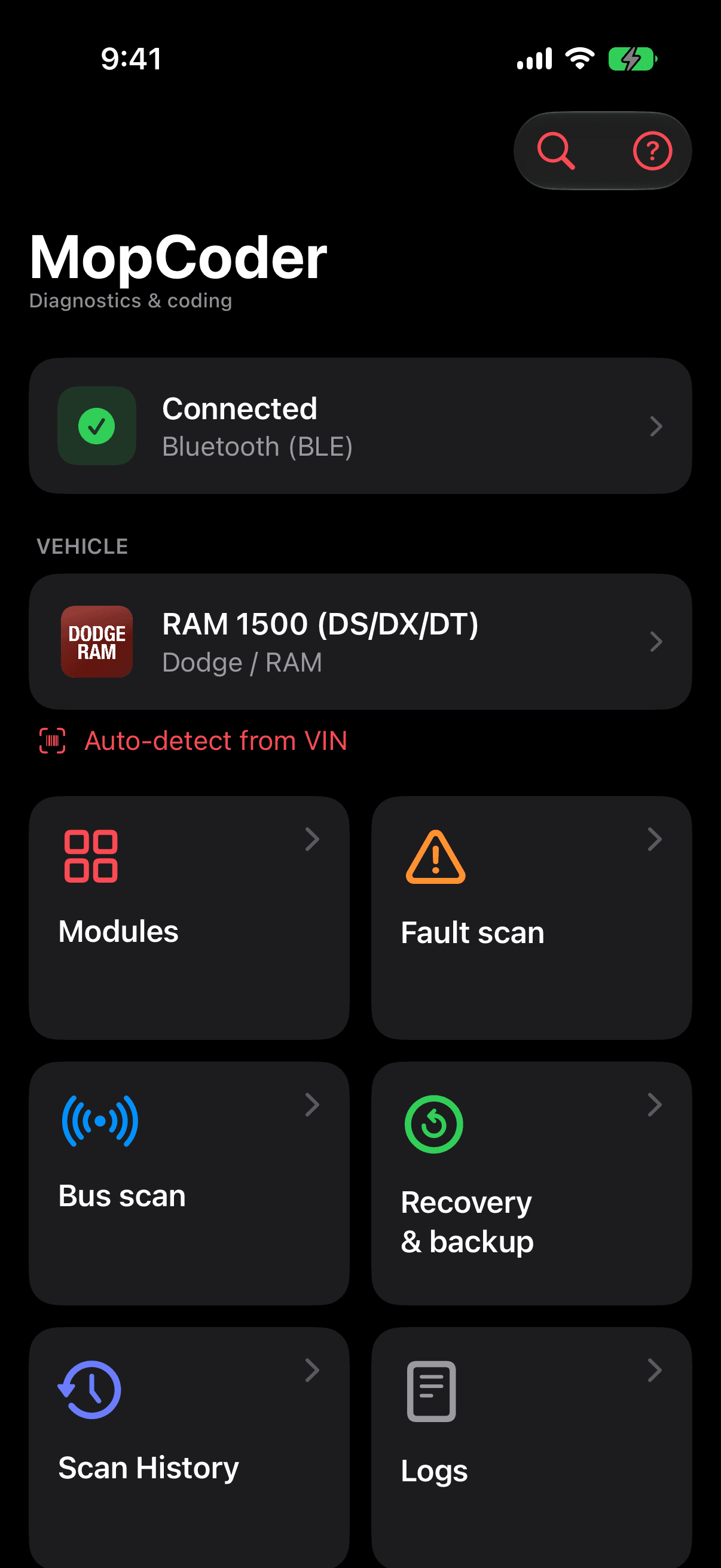
MopCoder home screen, connected to a RAM 1500

Pick your brand

Coding options, models and a sample report for each one.

What works on your car

Stellantis and Renault-group cars speak different languages, so MopCoder has an engine for each. Here’s exactly what each one does today, including the gaps.

  • Full ECU scan

    Stellantis
    Yes
    Renault group
    Yes
  • Read and clear fault codes

    Stellantis
    Yes
    Renault group
    Yes
  • Health report PDF

    Stellantis
    YesPlus a before and after repair report
    Renault group
    YesBefore and after comparison needs the VIN
  • Coding

    Stellantis
    Some modulesOn modules with a coding screen, such as body computers, clusters and radios
    Renault group
    Yes
  • Feature activation and procedures

    Stellantis
    Yes
    Renault group
    YesRoutines and special procedures
  • PIN code read and key programming

    Stellantis
    YesOn supported RF hub, WCM and body computer families
    Renault group
    Some modulesKey learning and steering lock resets; no PIN read
  • Module replacement

    Stellantis
    YesSecret key transfer, VIN write, proxy alignment, cluster odometer
    Renault group
    Some modulesBody computer and airbag crash data resets
  • Service procedures

    Stellantis
    YesOil reset, EPB pads, DPF, injectors, TPMS sensors, ABS bleed, gearbox adaptation
    Renault group
    YesOil reset, DPF, injectors, steering angle, gearbox adaptation; no EPB pad service or TPMS
  • Actuator tests

    Stellantis
    Yes
    Renault group
    Yes
  • Live data

    Stellantis
    YesDials, graphs, recording and playback
    Renault group
    Some modulesLive values, without graphs or recording
  • Scan history

    Stellantis
    Yes
    Renault group
    Yes
  • Configuration backup

    Stellantis
    YesAutomatic backup before writes; full save and restore on Chrysler body computers
    Renault group
    Not yet
  • VIN auto-detect

    Stellantis
    Yes
    Renault group
    YesRenault and Dacia
  • Bus scan

    Stellantis
    Yes
    Renault group
    Some modulesManual address scan
  • Radio code

    Stellantis
    YesCalculated offline from the radio serial
    Renault group
    Not yet
  • Proxy alignment and customer features

    Stellantis
    YesOn supported body computers
    Renault group
    Not yet

Reads the car Writes to the car, always confirmed first

A fault scan in progress, 22 of 75 modules checked

Full ECU scan

Scan the whole car in one go

MopCoder tries every module your model can have, from the engine and gearbox to the airbags, cluster and radio, and reads the stored faults from each one that answers. Faults come with a plain-language description, most urgent first.

  • Every module listed with its own result, including the ones that didn’t answer
  • Read and clear fault codes module by module
  • Scans are saved, so you can see whether a fault came back

Coding and feature activation

Switch on what the factory left off

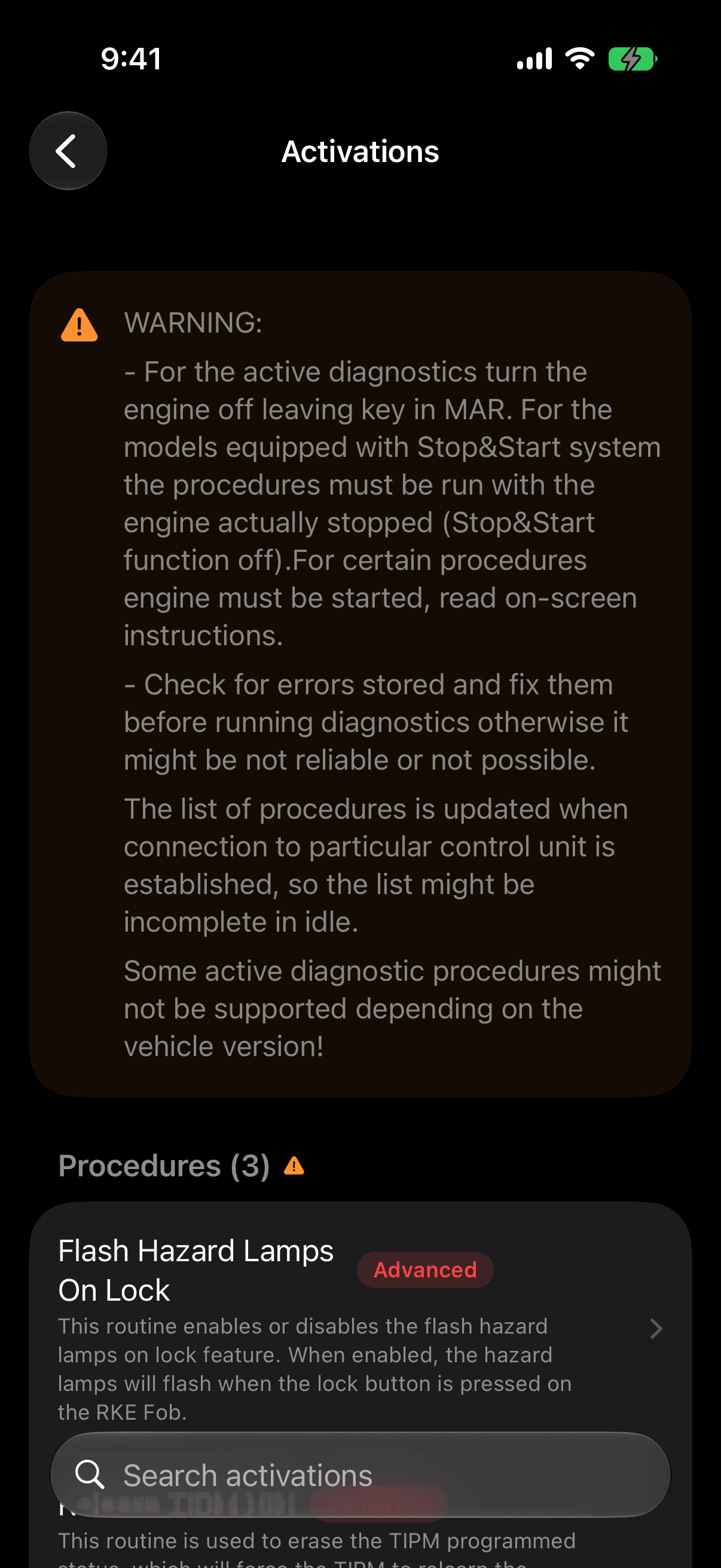
Coding opens on the values your car is set to right now, in groups, with switches and value lists instead of hex. Procedures walk you through each activation step by step. Every write names what will change and waits for you to confirm.

Looking for PIN codes, key programming or module replacement? See service and security

Procedures on a body computer, including flash hazard lamps on lock

Options you’ll find in the app

Real names from the modules MopCoder reads. Your car shows the ones its modules were built with.

Lights

  • Daytime running lights
  • Headlamps on with wipers
  • Front fog lights
  • Mirror turn signals
  • Rear LED turn signals
  • Greeting and approach lights
  • Auto high beams

Locks & keys

  • Flash hazards on lock
  • Horn chirp on lock
  • Horn chirp duration
  • Unlock all doors on first press
  • Auto door unlock
  • Program key fobs

Comfort

  • Remote start
  • Heated seats
  • Heated steering wheel
  • Power folding mirrors
  • Seat memory
  • Garage door opener
  • Auto wipers

Dashboard

  • Seatbelt chime
  • SRT pages
  • Off-road pages
  • Speedometer calibration (−16% to +16%)
  • Odometer units
  • Compass display
  • Oil service reset

Safety

  • Tyre size
  • Tyre pressure monitoring
  • 3-mode ESC
  • Rear camera guidelines
  • Forward collision warning
  • Lane departure warning
  • Adaptive cruise control

Audio

  • Apple CarPlay and Android Auto
  • Uconnect apps
  • Navigation
  • SiriusXM satellite radio
  • Premium sound system
  • Radio market and country

Engine

  • Engine idle shutdown
  • Active exhaust valves

Service and security

The jobs that used to need the dealer

Read the PIN code, program keys, align a replacement module and run the service procedures, with the conditions each one needs checked before it starts.

Keys, PIN and immobiliser

Read the security code, add or remove keys, and get a replacement immobiliser working with the car.

  • Read the PIN / security codeStellantisRead-only, on supported RF hub, WCM and body computer families
  • Program key fobs and ignition keysStellantisFOBIK baseline and highline, SKIM keys, RKE-only keys; PIN or Code Card protected
  • Key learningRenault groupOn supported modules; the Megane II card tool is marked experimental
  • Erase key fobsStellantis
  • Enable and disable keysStellantis
  • Transfer the secret keyStellantisBetween engine computer, RF hub, steering lock and WCM
  • Change the PINStellantis
  • Clear a VIN handshake immobiliser faultStellantis
  • Steering lock (EPS) immobiliser resetRenault groupClio III and IV, Modus, Zoe, Fluence, Megane III, Scenic III

Module replacement

Make a used or new module part of the car it’s fitted to.

  • RF hub, body computer, PEM and steering lock replacedStellantis
  • Airbag module initialisation after replacementStellantis
  • Proxy alignment and car configurationStellantis
  • VIN write, erase and relearnStellantis
  • Odometer write for a replacement clusterStellantisOn supported instrument clusters and engine computers
  • Used body computer (UCH) resetRenault groupMegane and Scenic II and III, Laguna II and III
  • Airbag crash data resetRenault groupAB90, ACU4, RSAT4 and Megane III airbag modules
  • VIN CRC calculatorRenault group

Service and maintenance

The resets and routines that follow a service or a new part.

  • Oil and service resetStellantis and Renault groupOil change and service data on FCA engines and dashboards; oil drain and service reset on Renault-group modules
  • DPF regenerationStellantis and Renault groupPlus DPF replacement, new DPF initialise and stationary desoot on FCA diesels
  • Injector codingStellantis and Renault groupClassification and quantity correction codes on FCA; injector codes on supported Renault-group engines
  • Gearbox and clutch adaptationStellantis and Renault groupClutch contact point, pedal learning and adaptive value reset
  • Throttle and adaptation relearnStellantis and Renault group
  • AdBlue first fill, pump and tank resetsStellantis
  • Zoe water pump counter resetRenault group

Brakes, tyres and chassis

The jobs you do with the car on stands.

  • Electric parking brake serviceStellantisApply, release and brake pad replacement; Brembo, Continental and Lucas systems
  • ABS brake bleedStellantisPaced step by step with the technician
  • Steering angle sensor calibrationStellantis and Renault group
  • Tyre pressure sensor ID programming and calibrationStellantisEach wheel and the spare
  • Adaptive cruise radar alignmentStellantis
  • Rain sensor proceduresStellantis
  • Sunroof initialisationStellantis

Radio

Unlock a radio and set it for the market it lives in.

  • Radio codeStellantisCalculated offline from the serial number
  • Radio country and market configurationStellantis

Health report PDF

A report you can hand to anyone

Turn a full scan into a clean A4 PDF. Share it with a buyer before you sell, ask a seller for one before you buy, or give it to your mechanic so they start where the car left off.

  • Every system checked

    With its result: faults found, clean, no answer or not probed.

  • Every fault code explained

    Description and status: warning light, confirmed, active, pending or stored.

  • Nothing hidden

    Modules that didn’t answer are listed apart, so silence never passes for a clean result.

  • Before and after a repair

    Compare two scans in one report: cleared, still present, and anything new.

MopCoder
Diagnostics & coding
Report MC2026091309410000
13/09/2026, 09:41
Dodge Vehicle Diagnostic Report
Vehicle information
Make / ModelDodge Challenger (LA)
VINNot read
Scan time13 Sep 2026, 09:41
Device information
ApplicationMopCoder 2.4
InterfaceOBDLink MX+
Report IDMC202609130941
Systems scanned (8)
SystemStatus / DTC
Engine control module2
Body control module1
Transmission control module0
Anti-lock brakes / ESC0
Airbag control module0
Instrument cluster0
Radio / Uconnect0
Heated seat moduleNo answer
Trouble codes
Engine control module2 codes
P0456Evaporative emission system, small leak detectedWarning light · Confirmed
P0420Catalyst system efficiency below thresholdPending
Body control module1 code
U0100Lost communication with ECM/PCMStored
MopCoder
Generated on this device. No vehicle data left the phone.
Page 1 of 1
Sample report. The vehicle and fault codes are for illustration.
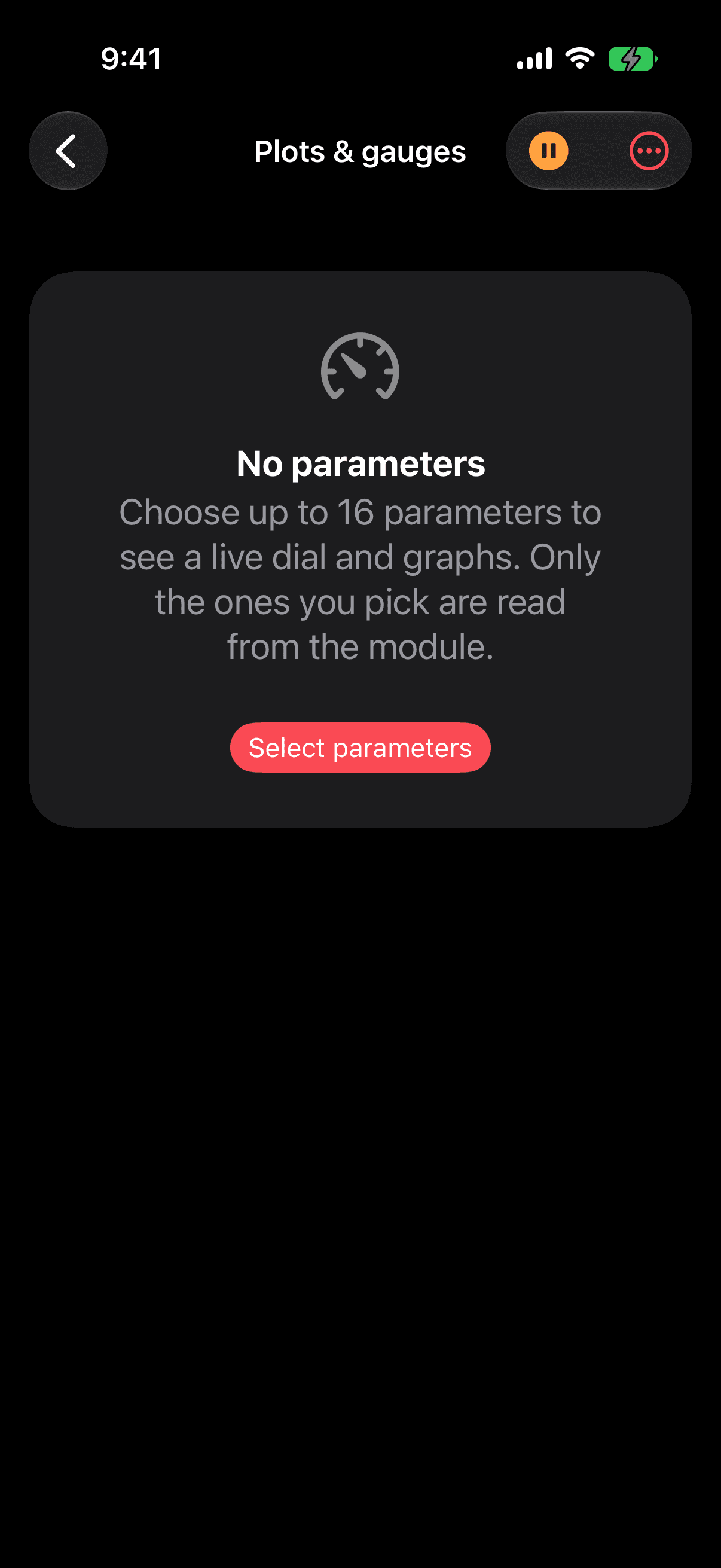
Plots and gauges, ready to choose up to sixteen parameters

Live data and actuator tests

Watch the engine think

Pick the values you care about and MopCoder reads only those. On Dodge, Jeep, Chrysler, RAM and the Italian brands, each one gets a dial and a graph, and you can record a drive and play it back.

  • Up to sixteen values at once
  • Record and replay a session
  • Fire outputs to test them: horn, wipers, fans, fuel pump and more
models in the vehicle catalog
335
Renault-group module definitions
6,778
fault code descriptions for FCA modules
22,103
FCA diagnostic procedures and tests
3,891

Colour is a promise about your car.

Every control in MopCoder is coloured by what it does to the vehicle. Learn three colours and you know what’s safe to tap before you tap it.

  1. Teal reads

    Live data, fault codes, module identity, the VIN. Nothing on the car changes, so tap anything.

    Engine coolant temperature92 °C
  2. Amber writes

    Coding and actuator tests. You see what will change and confirm it before a single byte is sent.

    Daytime running lightsOff → On
  3. Red can break something

    Clearing fault memory, resets, recovery. The app says exactly what you’ll lose and waits for you to confirm.

    Clear fault memory3 faults

And the rest of the toolbox

Auto-detect from VIN
MopCoder reads the VIN from the car and picks the right model and platform for you.
Recovery & backup
A backup is kept before every write on Dodge, Jeep, Chrysler, RAM and Italian modules, so you can put things back.
Before and after repair
Compare two scans of the same car and see what the repair cleared, what’s left and what’s new.
Radio code
Calculate the unlock code for FCA radios from the serial number, offline.
Proxy alignment
Realign the module network after fitting a used or new module on supported FCA body computers.
Vehicle records
Look up what a VIN says about a car, including the factory build sheet for Stellantis vehicles. Needs internet.

Actuator tests include

  • Horn
  • Front wipers, high and low
  • Rear wiper motor
  • Headlamp washers
  • Fuel pump relay
  • Window up and down
  • Radiator fan
  • Fog lights
  • Lock all doors
  • Liftgate release
  • Sunroof
  • Truck bed lighting
  • Siren check
  • Heated rear window
  • Speedometer and fuel gauge sweep
  • Rear camera video
  • Speaker test

Parked to diagnosed in two minutes

  1. Plug in an adapter

    It goes in the OBD port under the dashboard, usually by your left knee. Turn the ignition on.

  2. Connect and pick your car

    Tap Connect. MopCoder reads the VIN and selects your model, or you choose it from the list.

  3. Scan, code or report

    Start with a full scan, export the PDF, then open any module to change its settings.

Is my car supported?

Here are 206 popular models from 15 brands, with the platform code next to each name so you can tell a Charger LX from an LD. The app’s full catalog holds 335, including regional and commercial versions.

Pick a brand, or search across all of them.

  • Avenger (JS)2008–2014
  • Caliber (PM)2007–2012
  • Challenger (LC)2008–2014
  • Challenger (LA)2015+
  • Charger (LX)2006–2010
  • Charger (LD)2011–2023
  • Dakota (ND)2005–2012
  • Dart (PF)2013–2016
  • Durango (HB)2004–2009
  • Durango (WD)2011+
  • Forza (BK)2013+
  • Grand Caravan (RT)2008+
  • Journey (JC)2008+
  • Magnum (LX)2005–2009
  • Neon (PD)2015+
  • Nitro (KA)2007–2012
  • Viper (ZD)2013+
  • Vision (DV)2015–2018

Which adapter?

MopCoder works with the common Bluetooth and Wi-Fi adapters. The difference is which of your car’s networks they reach: engine faults work on all of them, body and comfort modules don’t.

No adapter yet? Choose Demo when you connect and explore the app on a simulated car.

No cloud between you and your car

  • Diagnostics run on your iPhone

    Vehicle catalogs, module definitions and fault descriptions ship inside the app, so scans, live data and coding never go through a server.

  • Security data is never written down

    Security seeds, computed keys and PINs pass through memory only and are kept out of every log the app can share.

  • Works with no signal

    Because the data is already on your phone, a scan works just the same in a garage, a field or an underground car park.

Questions

Something else? Write to support@mopcoder.app.

What do I need to get started?

An iPhone, the MopCoder app and an OBD-II adapter plugged into the port under your dashboard. With the ignition on, open the app, tap Connect and pick your car, or let the app read the VIN and pick it for you.

Can I try it without a car?

Yes. Choose Demo when connecting and the app simulates a vehicle, so you can walk through modules, faults and coding before you buy an adapter.

Can coding damage my car?

Any tool that writes to a module can. MopCoder confirms every write and names what will change before it sends anything, and it refuses when it can't be sure of the exact bytes. Keep the battery charged and never unplug the adapter while a module is writing.

Can I undo a change?

On Dodge, Jeep, Chrysler, RAM, Alfa Romeo and Fiat modules, MopCoder keeps an automatic backup in Recovery before it writes, and Chrysler-family body computers can save their whole configuration and restore it later. On Renault-group cars, note the original value before you change it.

Can MopCoder read my PIN code and program keys?

On Dodge, Jeep, Chrysler, RAM and Fiat-group cars, yes: MopCoder reads the PIN from supported RF hub, WCM and body computer families, then uses it to program, enable or erase key fobs. If your module family isn’t supported, the app says so and sends nothing. On Renault-group cars it offers key learning on supported modules and steering lock immobiliser resets, but not PIN code reading.

Can I fit a used module from another car?

That’s what the module replacement procedures are for: secret key transfer, VIN write, proxy alignment and, for instrument clusters, writing the odometer to match the car. On Renault-group cars, the used body computer and airbag crash data resets prepare a second-hand module.

Does it work the same on a Renault as on a Dodge?

The core is the same: full ECU scan, fault codes, health report, coding, procedures and actuator tests. Live data on Renault, Dacia and Nissan shows values without graphs or recording, and backup, radio code and proxy alignment are for Dodge, Jeep, Chrysler, RAM and the Italian brands. The table on this page lists every difference.

Does MopCoder send my data anywhere?

No. Vehicle catalogs, module definitions and fault descriptions ship inside the app. Your VIN, your faults and your drives stay on your iPhone. Security keys and PINs are never written to a log.

Which adapter should I buy?

For Dodge, Jeep, Chrysler, RAM, Alfa Romeo and Fiat, an OBDLink MX+. It reaches the comfort and body modules that cheaper ELM327 clones usually can't.

Is my car supported?

Search the vehicle list above. If your model is listed, the app has its modules. What each module offers depends on the exact version fitted to your car.
Plug in. Find out.

Download MopCoder, pick Demo, and see what it would show you about your car before you buy an adapter.